AI Tools
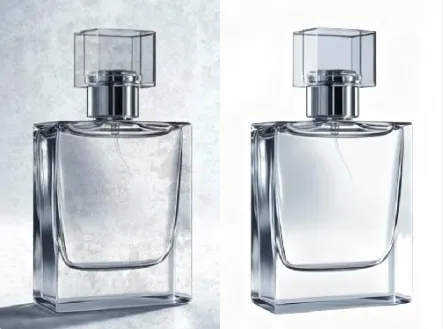
AI White Background AI Tools Generator
Create seamless product photos fast with White Background AI Tools and smart batch edits.
Studio-grade cutouts, instant batch processing, and marketplace-ready exports.
Real-World Applications
From solo sellers to design teams, bring studio polish to everyday images.
E-commerce Brands
Generate high-quality product shots for listings without studio rents or long turnarounds.
Photographers
Quickly deliver cleaned images to clients while preserving fine detail around edges and textures.
Social Media Managers
Create consistent post images and thumbnails that boost click-throughs and keep the feed tidy.
Why Visual Teams Choose This Tool
Cut costs, speed workflows, and keep every image brand-consistent with minimal effort.
Consistent Background Neutralization
Remove color casts and shadow noise so every item sits on a clean plane. Your catalog looks unified across channels.
Fast Batch Processing with Presets
Apply one click to hundreds of images and keep output consistent. You save time and avoid repetitive editing.
White Background AI Tools for Bulk Jobs
Scale seasonal launches without new photoshoots by auto-prepping large sets. You get marketplace-ready files immediately.
Smart Edge Refinement
Delicate details like hair or fur are preserved while the backdrop is removed. Your products retain a natural, premium look.
Export Flexibility for All Platforms
Save transparent PNGs, white-back JPEGs, or platform-optimized variants with one click. Your files match each sales channel's rules.
Lightweight Onboarding and Integrations
No steep learning curve—teams can start in minutes and tie outputs into existing pipelines. Your workflow keeps moving.
How Do You Turn a Phone Photo into a Studio-Ready Image?
Your 3-step path to clean backgrounds and ready-to-sell images.
- Step 1
Upload Your Photos
You select files from your device or cloud storage and drop them into the uploader; the tool accepts mixed batches so you can process everything at once.
- Step 2
Choose a Preset and Adjust
You pick a style or tweak edge smoothness and brightness so each image matches your brand; quick previews show final results before export.
- Step 3
Export and Distribute
You export white-background JPEGs or transparent PNGs and push them to marketplaces or a content library with one click.
Frequently Asked Questions
Can I export images for marketplaces without extra steps?
Will the tool keep fine details like hair or lace?
Is there a bulk upload option for seasonal catalogs?
Are images copyright-safe after processing?
Can I customize presets for my brand look?
Complete Your Brand Toolkit