AI Tools
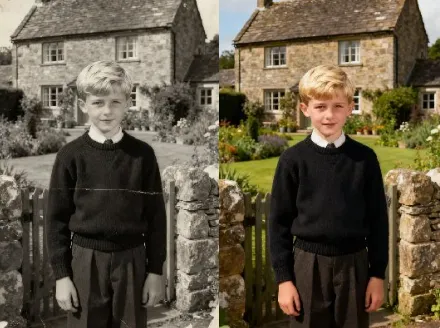
AI Photo Restoration AI Tools Generator
Recover memories fast with Photo Restoration AI Tools for sharp, natural photos.
A high-fidelity restoration suite that upscales, repairs color, and removes damage with minimal input.
Real-World Applications
From personal memories to brand archival work, restore visuals that matter.
E-commerce Brands
Refresh product photos from legacy catalogs to match modern storefront standards without new shoots.
Museums and Archives
Digitize and repair fragile prints to share history online while protecting originals.
Families and Hobbyists
Turn a shoebox of faded prints into shareable, frame-ready images with emotional clarity.
Why Creative Teams Choose This Toolkit
Speed, fidelity, and minimal workflow disruption—restore photos without losing the story.
Photo Restoration AI Tools: One-Click Repair
Instantly fix scratches and tears so you can relive moments without manual cleanup.
Photo Restoration AI Tools: Gentle Color Revival
Revive faded tones while preserving skin and fabric nuances for authentic results.
Photo Restoration AI Tools: Smart Upscaling
Increase resolution for prints or social posts without creating artifacts or halos.
Photo Restoration AI Tools: Batch Processing
Process dozens of images with consistent settings to save time on large archives.
Photo Restoration AI Tools: Context-Aware Repair
Keep faces and key details intact while the algorithm handles backgrounds and noise.
Photo Restoration AI Tools: Export-Ready Files
Get high-quality JPGs and TIFFs optimized for printing or web sharing in one click.
How Can You Restore a Damaged Photo in Minutes?
Your 3-step path to clear, printable, shareable images.
- Step 1
Upload Your Photo
You drag and drop the scan or photo into the app. The interface previews damage points instantly.
- Step 2
Choose a Restoration Style
You pick from gentle, standard, or aggressive modes so your image keeps its original feel.
- Step 3
Export and Share
You export high-resolution files or web-ready images, and share them with loved ones or stakeholders.
Frequently Asked Questions
Can I use this to fix scanned negatives?
Will I lose original details when enhancing?
How do I export files for print or web?
Is this safe for archival materials and copyrights?
Can I automate restoration for thousands of images?
Complete Your Visual Toolkit